Shops and Events

Your shop and your events, one link.

Sell products and event tickets from your own page. Buyers pay with MTN or Airtel mobile money, and the money goes straight to your Ssentezo Wallet.

wallet.ssentezo.com/@yourshop

For verified Ssentezo Wallet businesses. No monthly fee.
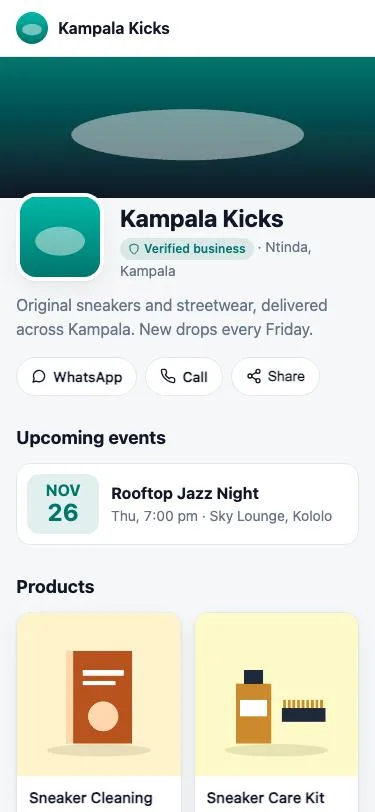
A shop page on a phone: the business name, a Verified business badge, an upcoming event and products

Online shop

A shop your customers can pay in, in minutes

No website to build. Add your products, share your link, and get paid.

  • Products with options Sizes, colours and stock for each option. Items sell out on their own when stock runs out.
  • Photos that load fast Upload photos from your phone. We resize them so your shop loads quickly on mobile data.
  • Pickup and delivery Set your delivery areas and fees, or let buyers collect from your shop.
  • Digital products Sell e-books, music or files. Buyers get a download link once they have paid.
  • Orders with SMS updates You get an SMS for every sale. Move each order to preparing, ready for pickup, out for delivery and completed. The buyer gets an SMS at each step.
  • QR poster Print a poster with your shop QR code for your counter or stall.
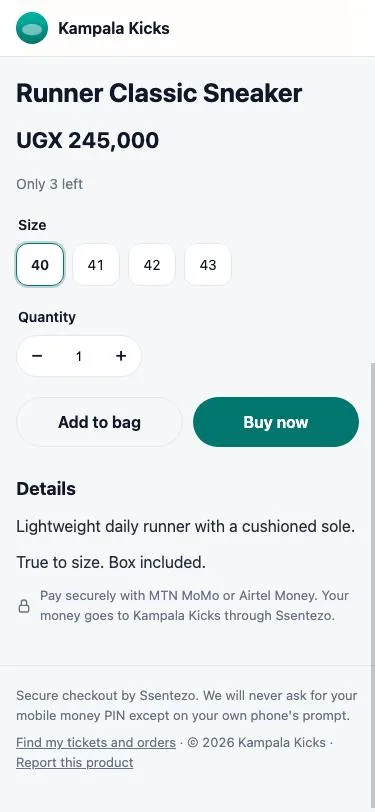
A product page with sizes, quantity, Add to bag and Buy now buttons
Buyers pick a size and pay
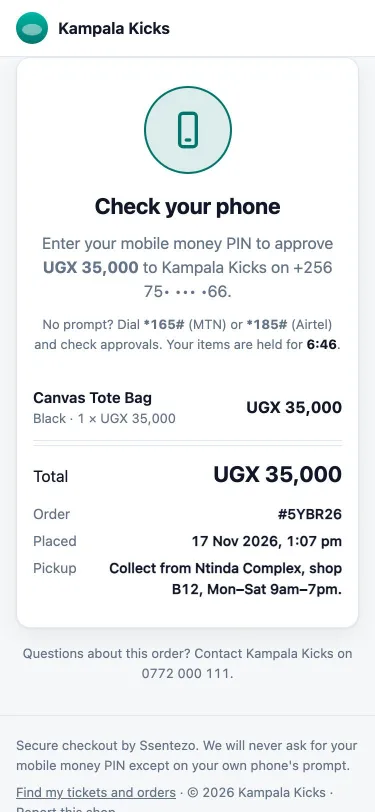
The checkout page asking the buyer to check their phone and approve the payment
They approve on their own phone

Event tickets

Sell tickets and check people in at the door

Concerts, conferences, church events, sports days: create the event, set your prices and share the link.

  • Ticket types Early bird, Regular, VIP and more, each with its own price, number of tickets and sales dates. Hide a type behind an access code for guests or sponsors.
  • Capacity you control Set the venue capacity and never sell more tickets than you have seats.
  • QR tickets by SMS Each ticket has its own QR code and serial number. Buyers get them by SMS straight after paying.
  • Door scanner Your staff scan tickets with a phone browser, no app to install. Each ticket gets in once. Any phone can check a ticket by typing its serial.
  • Attendee list See who is coming and who has arrived, and download the list as a spreadsheet.
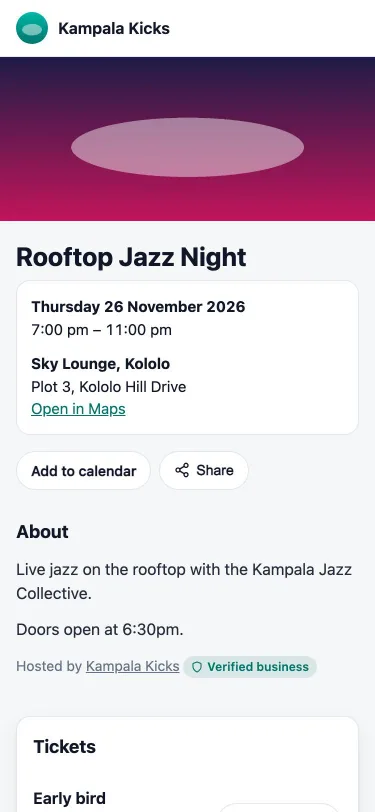
An event page with the date, venue, Add to calendar and ticket types
Your event page
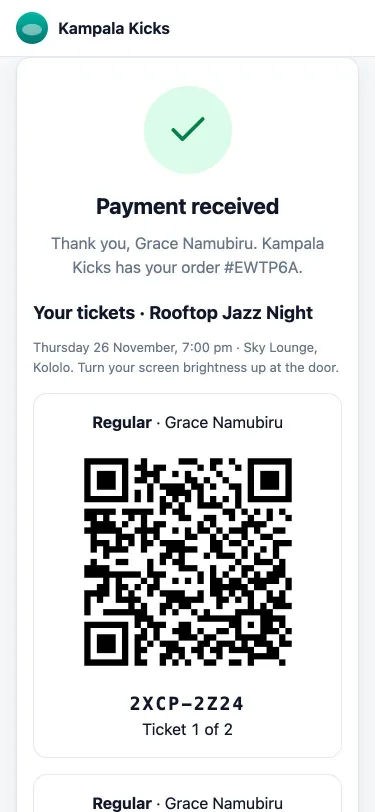
A paid order showing a QR ticket with its serial number
The buyer's QR ticket

How it works

From your link to money in your wallet

Selling products

  1. 1 Choose your shop link, logo and colours.
  2. 2 Add your products, prices and stock, then publish.
  3. 3 Share your link on WhatsApp, social media or a QR poster.
  4. 4 The buyer pays with mobile money on their own phone.
  5. 5 You get an SMS, prepare the order and update its status. The buyer gets an SMS at each step.

Selling tickets

  1. 1 Create your event with its date, venue and ticket types.
  2. 2 Publish it. It appears on your shop page with its own link.
  3. 3 Buyers pay and get their QR tickets by SMS.
  4. 4 On the day, your staff scan tickets at the door.
  5. 5 After the event, the ticket money is released to your wallet.

Getting paid

Your money, in your wallet

Sales land in the Ssentezo Wallet you already use. Withdraw to mobile money or your bank as usual.

Shop sales

Reach your wallet as soon as the buyer's payment settles, like any other collection.

Ticket sales

Held until after your event, then released automatically, usually within 1 to 3 days of it ending. If you cancel the event, the held money refunds every buyer. That promise is why people buy tickets from organizers they don't know yet.

Refunds

Refund all or part of an order from your dashboard. The money goes back to the number that paid, and you confirm each refund with a code we email you.

Safe for you and your buyers

Built so people trust your link

Verified business badge

Buyers see that your business has passed Ssentezo checks.

No PIN on our pages

Buyers approve payments on their own phone. Ssentezo never asks for a mobile money PIN.

Tickets that can't be copied

Every QR code is signed, and each ticket gets in once. A screenshot of a used ticket is turned away.

Report a problem

Every page of your shop has a Report link, and our team reviews each report.

Fees

No monthly fee. Pay only when you sell.

Mobile money sale (MTN, Airtel)
2.5%
Card sale, where enabled
5%
Refund to a buyer
Standard payout fee
Setting up your shop or event
Free

Sales are charged like any other collection, inclusive of all taxes and charges. See the full price list.

Questions

Shops and Events FAQ

Shops and Events

It is your own page on Ssentezo Wallet, such as wallet.ssentezo.com/@yourshop. It shows your products and upcoming events, and buyers pay you there with mobile money. Share it on WhatsApp, Instagram, TikTok or a printed QR poster.

Shops and Events is available to verified Ssentezo Wallet businesses that can collect payments. During the pilot we switch it on for each business: message us on WhatsApp and we will check your account and turn it on.

Buyers do not need an account or an app. They enter their phone number, approve a prompt on their phone with their own mobile money PIN (MTN or Airtel), and the page updates by itself. Card payments are available where they are enabled for your business.

There is no monthly fee. Each sale is charged like any other collection: 2.5% for mobile money and 5% for cards where enabled. Refunds are charged the standard payout fee.

Shop sales reach your wallet as soon as the payment settles. Ticket money is held until after your event and released automatically, usually within 1 to 3 days of the event ending. While it is held it can refund buyers if the event is cancelled, which is why buyers can trust a ticket from a business they have never heard of.

You refund an order from your dashboard, in full or in part, and confirm it with a code we email you. The money goes back to the mobile money number that paid, and the buyer gets an SMS. If you cancel an event, every ticket buyer is refunded automatically from the held ticket money.

Yes. Give a staff member only the Scan tickets permission. They can open the door scanner and check tickets in, but cannot see orders, refunds or your balance.

Yes. Shops and Events is the quickest way to start, but you can also take payments on your own website or app with the Ssentezo Wallet API, SDKs and plugins. See the developer portal.

Buying from a Ssentezo shop? Read the help for buyers.

Ready to sell online?

Already have a Ssentezo Wallet business account? Message us and we'll switch on Shops and Events for you.

Chat with us